Mastering Digital Marketing Banners: A Practical Guide
There is a distinct pressure in the digital marketing space to create visuals that stop the scroll without draining the budget. Whether you are a freelancer juggling multiple clients or a small business owner managing your own social presence, the gap between a professional campaign and a mediocre one often lies in the execution details. This is where a high-quality Marketing Agency Web Banner Template becomes less of a luxury and more of a structural necessity. It provides the canvas, allowing you to focus entirely on the message.
The Anatomy of a High-Performance Template
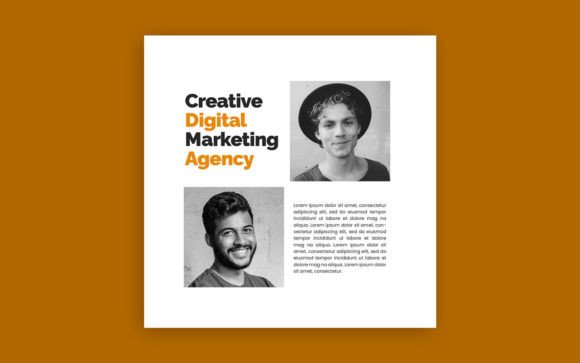
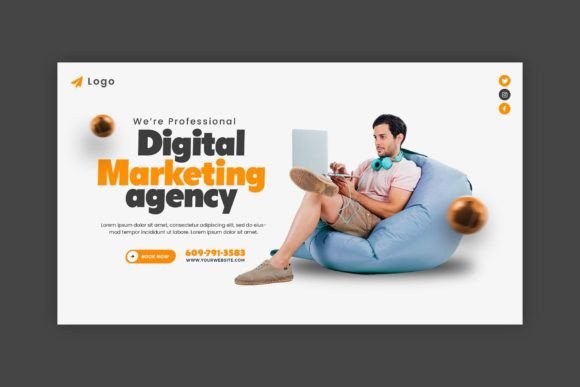
When you first open a file like the Digital Marketing Agency Web Banner Template, you aren't just looking at a flat image. You are looking at a structured system. The value here lies in the technical specifications that ensure your final output looks crisp across devices. We are talking about 300 DPI resolution, which is the gold standard for print clarity, but more importantly, it ensures that even when cropped for a web thumbnail, the image retains its sharpness. The use of RGB Color Mode is vital here; this is specifically calibrated for screens, ensuring that the vibrant blues, moody darks, or energetic neons you choose translate accurately from your monitor to your audience's mobile device.
The visual personality of these templates usually leans into modern aesthetics—clean lines, bold typography, and structured grids. They are designed to look professional immediately. However, the real power is in the file organization. Grouped & sequenced layers mean the file isn't a chaotic mess. As a designer, you know the frustration of opening a file where every single element is flattened or unnamed. Here, the layers are separated logically. The background is distinct from the foreground elements, and the text layers are independent of the image placeholders. This structure respects your workflow, allowing for rapid iteration.
Typography: The Voice of Your Design
A visual is only as good as the text that accompanies it, and this is where the choice of typeface makes or breaks the hierarchy. The inclusion of Tondu Beta and Poppins in this template is a strategic design choice worth analyzing.
Poppins is a geometric sans serif font. It is the workhorse of modern web design. Its rounded letterforms feel friendly and accessible, yet it maintains a professional neutrality that works for corporate branding. It handles body copy and subheadings with ease, ensuring high readability even at smaller sizes on mobile screens. It is a premium font choice that signals stability.
In contrast, Tondu Beta brings the energy. It is a display font with character. Often used for headers, it commands attention without shouting. The interplay between the structured geometry of Poppins and the distinct personality of Tondu Beta creates a natural visual hierarchy. This font pairing guides the viewer’s eye exactly where it needs to go—from the headline offer to the supporting details and finally to the call to action.
Practical Application and Customization
The claim that these files are easy to edit is not just marketing copy; it is a requirement for modern design assets. You do not need to be a Photoshop wizard to make this template yours. The process is intuitive: change the text, swap the photos, and adjust the colors.
Here is how to approach it practically:
- Photo Integration: Do not just drag and drop a stock photo. Consider the lighting of the template. If the banner has a dark overlay, choose a high-contrast image with a clear focal point.
- Color Psychology: Changing the color isn't just about aesthetics; it's about brand identity. If you are working for a finance client, move towards blues and greys for trust. For a fitness brand, shift to high-energy oranges or greens.
- Text Hierarchy: Use the bold display font for the offer (e.g., "50% Off") and the clean sans serif for the "How" and "When".
This template is versatile. While it is branded as a Marketing Agency Web Banner Template, its utility extends far beyond agencies. It is perfect for social media graphics on LinkedIn or Instagram, website hero sections, email newsletter headers, and even editorial design for digital magazines. The fully customized layers allow you to strip away elements you don't need, perhaps simplifying the design for a clean web design aesthetic or adding complexity for a print flyer.
Ensuring Professional Standards
For designers and entrepreneurs, consistency is key. Using a template ensures that your brand identity remains consistent across different campaigns. The fonts included are free for commercial use, removing the headache of licensing issues—a common pitfall in packaging design and logo design projects.
When evaluating this for your next project, test the scalability. Zoom in to check the 300 DPI fidelity. Check the color contrast to ensure your text pops against the background. Because the layers are sequenced, you can easily duplicate a banner and resize it for different platforms, maintaining that professional sheen whether it appears on a desktop sidebar or a mobile story.
Ultimately, this Digital Marketing Agency Web Banner Template is a tool for efficiency. It bridges the gap between a concept and a polished, market-ready asset. It allows you to leverage modern typography and professional layout structures without starting from scratch, giving you the freedom to focus on what actually matters: your message and your audience.