Mastering Your Brand's First Impression
A Practical Guide to the Modern Professional Toolkit
When you are building a brand, the gap between looking "amateur" and "established" often comes down to the quality of your foundational documents. You might have a brilliant service or product, but if you hand a potential investor or client a messy, poorly aligned Word document, you are fighting an uphill battle. This is where having a robust Company Profile Brochure Template changes the game. It is not just about pretty colors; it is about structural integrity. This specific asset is designed to bridge the gap between raw data and polished presentation, offering a premium font aesthetic and layout logic that usually requires a professional agency to produce from scratch.
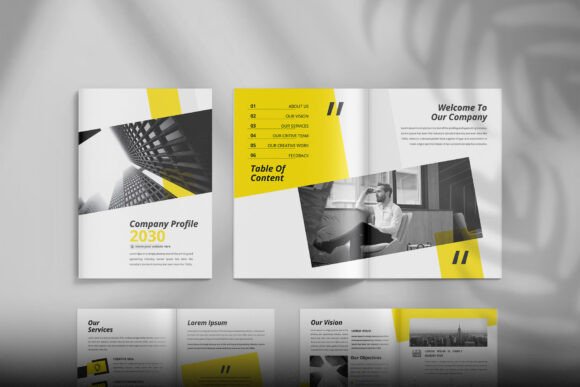
The visual personality of this design leans heavily into modern typography and clean minimalism. You are not dealing with cluttered backgrounds or distracting gradients. Instead, the design relies on strong negative space and a disciplined grid system. It feels authoritative yet approachable. The style is corporate-friendly but avoids the stuffy, boring look of 1990s annual reports. It uses a combination of sharp lines and structured content blocks to guide the eye. Whether you are a startup founder or a freelance designer, the appeal lies in its versatility. It looks expensive and custom-made, but because it is a vector asset, it is incredibly malleable.
Technical Specifications: Built for Print and Digital
Let’s talk specs because, for a designer, the details matter. This Company Profile Brochure Template is built on a standard international size of 8.27x11.69 inches (A4), which makes it perfect for global business use. However, the critical feature here is the 0.125 Bleed. If you have ever sent a file to a printer only to get it back with ugly white edges on the side, you know why bleed is non-negotiable. This template is Print Ready at 300dpi, ensuring your text and images are crisp, not pixelated.
The file structure is robust, including AI Files for Adobe Illustrator CC and EPS Files for broader compatibility. This is not a flattened PDF where you are stuck with the original text. It is Fully Editable and Layered, meaning you can isolate specific elements—like a sidebar, a photo frame, or a specific heading—and modify them without breaking the rest of the layout. The color mode is RGB, which is optimized for screens, but the vectors ensure you can convert to CMYK for print without losing quality. It also includes links to free fonts, so you don't have to worry about licensing costs for the typefaces used in the demo.
Real-World Applications: Beyond the Corporate Binder
While the name suggests a corporate use case, the utility of this Company Profile Brochure Template extends far beyond standard business proposals. Because the design is so neutral and professional, it acts as a skeleton for various brand identity projects.
- For Startups and Pitch Decks: If you are meeting a venture capitalist, you need more than a slide deck. You need a leave-behind. This template allows you to map out your mission, team, and data in a format that feels substantial.
- For Freelancers: Use it as a portfolio brochure. The editorial design layout is perfect for showcasing high-res images of your work alongside client testimonials.
- For Internal Communication: Large companies often use this style of layout for internal culture books or onboarding manuals.
The 16-page count is the "Goldilocks" zone for a brochure. It is enough space to tell a comprehensive story without becoming a novel that no one will read. You have room for a cover, an introduction, service breakdowns, case studies, team bios, and contact info, all within a cohesive flow.
Customization and Design Strategy
The real power of this asset lies in how you customize it. The template uses a layered structure, which means you have full control over the visual hierarchy. If your brand uses a specific sans serif font for headlines and a serif font for body copy, you can swap these in easily. The documentation file included with the download provides the links for the free fonts used in the preview, ensuring you can replicate the look immediately or find suitable replacements.
When editing, focus on the grid. The designers who built this template have already done the heavy lifting regarding alignment and spacing. Your job is to respect that negative space. Don't try to cram too much text onto a single page just because the space is there. Let the layout breathe. Use the image placeholders to bring in your own photography or stock images (note that stock images are usually not included, so you will need to source those separately).
Why Format Matters: AI vs. EPS
You might wonder why the package includes both AI and EPS versions. Adobe Illustrator (AI) is the native format, offering the highest fidelity and easiest editing experience if you have the CC subscription. However, the EPS (Encapsulated PostScript) file ensures that users of older software versions or alternative vector programs (like Affinity Designer or CorelDRAW) can still open and edit the design assets. This inclusivity is vital for collaborative environments where a marketing team might be using different software than the design team.
Final Thoughts on Professional Presentation
Ultimately, a Company Profile Brochure Template is a tool to build trust. In a digital-first world, a tangible, well-designed brochure—or a high-quality digital PDF—signals that you are serious about your business. It demonstrates an attention to detail that clients subconsciously apply to how you will handle their projects. By starting with a high-quality, print-ready foundation, you save hours of layout time and avoid common design pitfalls. It is a practical investment in your brand's visual communication strategy.